
EveryDollar: Budget Management
Ramsey SolutionsFinance
4.36.80K Reviews
- Version
- 2026.8.260
- Installs
- 1.00M
- Age Rating
- Everyone
Screenshots



Our Review of EveryDollar: Budget Management
 Analysis by Appyee
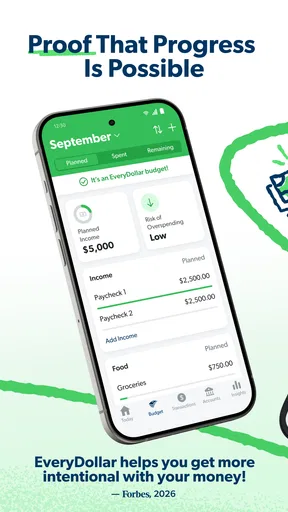
I usually open a budgeting app when I want a clearer answer to a simple question: where did my money go, and what can I still afford before payday? EveryDollar is built around giving each dollar a job, so it suits people who want to plan spending rather than just review a list of past transactions. I find that distinction useful: a budget is most helpful when I can act on it before the money is gone.
Ramsey Solutions makes this finance app for people who want budgeting to be part of learning how to manage money, not only a way to record purchases. It is free to download, rated for Everyone, and has a 4.3 average from around 15,000 ratings, with more than a million installs. The current version is 2026.2.20, and the app supports Android 8.0 and later. In-app purchases range from $7.99 to $129.99 per item, so I would check the available plan details before deciding whether paid features make sense for my routine.
Begin with the money you actually have
The most useful starting point is a realistic picture of income and regular commitments. I would not begin by guessing what I ought to spend on every category; I would first list the income I expect and the expenses I already know are coming. That makes the budget a working plan instead of an idealized one that falls apart after the first unexpected grocery run.
A practical first pass can include housing, utilities, transport, food, debt payments, and savings. Then I would leave room for less predictable costs rather than pretending they will not happen. The benefit of assigning money before spending is not that every month becomes perfectly predictable. It is that I can see which choices need attention when the plan and reality start to differ.
Setting Up Your Budget
Right off the bat, setting up EveryDollar is a breeze. The app guides you through the initial setup with a series of straightforward prompts. It asks for your income details, and you can start customizing your budget categories. This intuitive setup is perfect for budgeting newbies and seasoned pros alike.
One of my favorite things is how you can drag and drop to organize your categories. Want to allocate more to your "Fun Money"? Just slide it over. It’s as satisfying as arranging a playlist of your favorite songs.
Make the first plan useful, not perfect
When I set up a budget, I would treat the first version as a draft. If the planned amount for groceries is consistently too low, that is useful feedback about the plan, not proof that budgeting has failed. I would adjust the category based on what the household can realistically spend, then look elsewhere for a trade-off if the total no longer balances.
That balancing step is a good reason to create categories for occasional expenses as well as weekly ones. A car repair, school costs, or an annual bill can disrupt a monthly plan if I leave them out. Dividing those expected costs into manageable contributions can make the budget more honest, even when the app itself cannot predict what will happen next.
Tracking Expenses
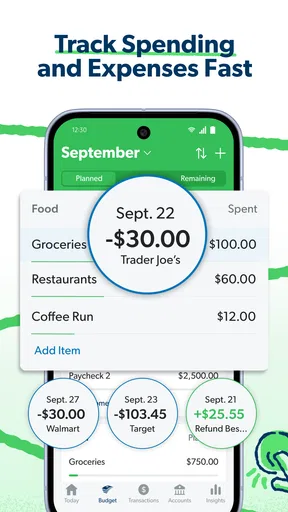
Once you’ve set up your budget, the real magic happens when you start tracking expenses. You can manually enter each purchase, which might seem tedious, but it’s an eye-opener. Seeing every dollar (pun intended) laid out in front of you is a reality check. Plus, it forces you to think twice before splurging on that extra latte.
The app also allows you to split transactions across multiple categories. This is super handy if you, like me, tend to buy groceries and that sneaky chocolate bar in one go. No more mental gymnastics trying to remember what went where.
A realistic day-to-day routine
Imagine I stop for groceries after work and pay for household food, toiletries, and a small treat in one checkout. Splitting the purchase lets me put each part in its proper category instead of letting the whole receipt distort the grocery total. If I enter purchases as I go, I can see the remaining room in those categories before the next shopping trip, rather than discovering the overspend at the end of the month.
For a shared household, I would also agree on who records purchases and when. If one person assumes the other has logged a card payment, the budget can look healthier than it is. A short check-in after a shopping trip—or a regular moment to reconcile spending—helps keep the plan useful without turning every purchase into a negotiation.
Connecting Your Bank
For those who prefer automation, you can connect your bank accounts for seamless transaction importing. This feature is currently part of the paid version, but it’s worth considering if manual entry isn’t your style.
Personally, I like the control of entering expenses myself, but I can see the appeal of having it all done for you. Just keep in mind that the automatic import might miss a transaction or two, so it’s good practice to check in regularly.
Choose the right handoff between bank and budget
Bank importing can reduce the effort of recording transactions, but it does not remove the need to review them. I would use imported activity as a prompt to confirm what a purchase was for and whether it belongs in one category or several. That small handoff—from the bank’s transaction record to my budget—matters most when a merchant name is unfamiliar or one payment covers different kinds of spending.
If I prefer a hands-on method, manual entry can make each purchase more noticeable and keep me engaged with the plan. The trade-off is consistency: it is easy to fall behind during a busy week. Someone deciding between the two approaches should think less about which sounds more advanced and more about which one they will actually maintain.
Sticking to Your Plan
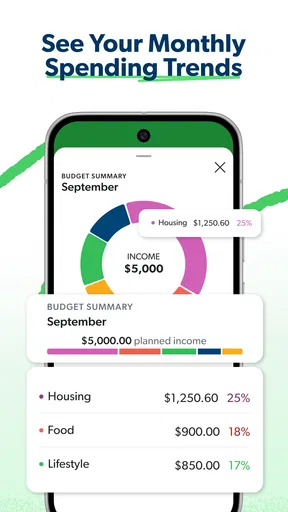
Creating a budget is one thing, sticking to it is another. EveryDollar comes in clutch here with its visual feedback. You can see at a glance how much you’ve spent in each category and how much you have left. The color-coding system is particularly helpful, with green meaning you’re good, yellow for caution, and red screaming "stop spending!"
The app also sends reminders for upcoming bills, ensuring you never miss a payment. It’s like having a personal finance assistant tucked in your pocket.
Turn alerts and category balances into decisions
I would use the category view before making a nonessential purchase, not only after it. If dining out is nearly used up but another category has room, the next decision is whether moving money makes sense or whether I would rather stop spending there for the month. The visual warning is helpful as a signal, but it cannot decide which trade-off fits my priorities.
Bill reminders can make upcoming obligations harder to overlook, but I would still keep the actual payment routine separate and verify that a bill is paid. A reminder is a useful nudge, not a substitute for checking a bank balance or confirming a payment went through. That distinction matters if missing a due date would cause a fee or other trouble.
Goal Setting and Achieving
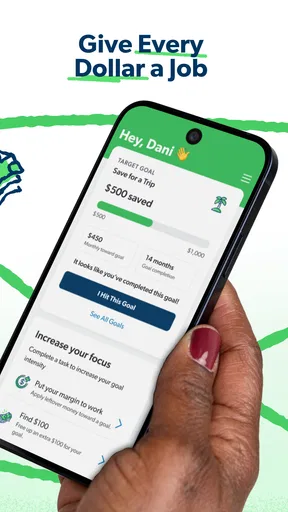
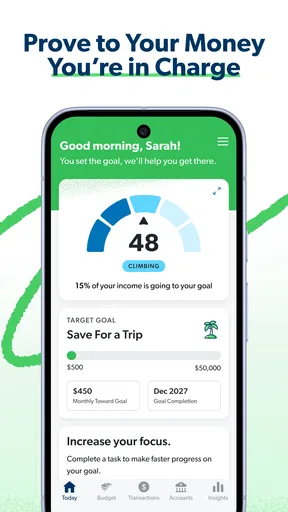
EveryDollar isn’t just about keeping tabs on your spending. It’s also a fantastic tool for setting and achieving financial goals. Whether it’s saving for a vacation or paying off debt, you can create goals and track your progress right in the app.
Seeing your savings grow is incredibly motivating. It’s like watching the bar fill up in a video game—only this time, you’re leveling up your financial future.
Use goals to give spare money a purpose
A goal is especially helpful when the budget has a clear destination for money left after essentials. For example, if I am setting aside money for a trip, I can treat that contribution as a planned category rather than hoping that whatever remains at month’s end will be enough. For debt repayment, a visible target can help me keep the payment in view while still leaving room for necessary expenses.
I would avoid setting too many goals at once. A long list can make progress feel scattered, particularly when income is tight. Choosing one priority, such as building savings or paying down a particular balance, makes it easier to see whether the current budget is moving me toward something I care about.
How it compares with other budgeting approaches
Compared with a basic expense tracker, EveryDollar is more focused on planning where income should go before the month unfolds. That makes it a better fit for someone who wants category limits and a deliberate spending plan than for someone who only wants charts of past transactions. A spreadsheet can offer more freedom to design formulas and reports, but it asks the user to build and maintain that structure. A bank’s built-in tools may be convenient for reviewing account activity, though they may not encourage the same hands-on allocation process.
The choice is about working style, not a universal winner. If I enjoy adjusting categories and checking in on a plan, this approach can keep financial decisions visible. If I want investment analysis, complex household reporting, or a highly customized spreadsheet-like system, I would look for a tool designed around those needs rather than expecting a straightforward budget app to do everything.
Where the routine can break down
The main friction is the work required to keep transactions and category balances current. Manual recording can feel repetitive, especially for someone who makes frequent small purchases or already tracks spending elsewhere. Bank importing can ease that load, but imported activity still benefits from review, and the paid access may not suit someone who wants to avoid subscriptions or in-app spending altogether.
Another limitation is that a budget is only as useful as the assumptions behind it. Irregular income, shared expenses, or frequent changes in bills can require more attention than a simple monthly plan suggests. I would be cautious about relying on any single color or balance as a complete picture of financial health: the app helps organize decisions, but it does not make those decisions or replace checking account records.
Who will get the most from it
I think the app is strongest for people who want a clear monthly structure, are willing to review spending, and find motivation in assigning money to specific categories and goals. It can also be a reasonable starting point for someone new to budgeting because the basic process is easy to understand: plan, record, compare, and adjust.
I would skip it if I know I will not keep up with manual entries and do not want to pay for bank importing, or if I need detailed financial dashboards beyond budgeting. People managing money with a partner should also decide together how updates will be handled; the plan only helps when both people are looking at a reasonably current picture. Free access makes it possible to try the basic approach without an upfront purchase, while optional in-app purchases mean I would review the cost before committing to a paid workflow.
Final Thoughts
So, is EveryDollar the budgeting app for you? If you’re looking for a straightforward, user-friendly app that helps you take control of your finances, it’s definitely worth a try. The manual entry might seem like a chore, but it’s a valuable exercise in mindfulness. Plus, the visual feedback and goal-setting features make it more than just a budgeting tool—it’s a financial empowerment app.
Whether you’re a budgeting newbie or a seasoned financial guru, EveryDollar offers a clean, intuitive experience that’s sure to help you manage your money better. So, are you ready to make every dollar count?
Verdict
Strengths of EveryDollar: Budget Management
- Intuitive interface for easy navigation.
- Customizable budget categories.
- Real-time expense tracking.
- Syncs across multiple devices.
- Secure data encryption.
Limitations of EveryDollar: Budget Management
- Limited features in free version.
- No automatic transaction import.
- Ads in the free version.
- Requires internet for updates.
- No investment tracking options.
Similar Picks in This Category
View All
Google Wallet
Google LLC4.3

Airtel: Recharge, Bank & Loans
Airtel4.0

PayPal - Pay, Send, Save
PayPal Mobile4.2

DANA Indonesia Digital Wallet
PT Espay Debit Indonesia Koe4.5

Binance: Buy Bitcoin & Crypto
Binance Inc.4.8

Cash App
Block, Inc.4.7
Frequently Asked Questions
What is EveryDollar and how does it work?
EveryDollar is a budgeting app designed to help users manage their finances effectively. It operates on the zero-based budgeting principle, meaning every dollar is assigned a role in your budget. Users can track expenses, set financial goals, and monitor spending habits to ensure they stay on track with their financial plans.
Is EveryDollar free to use?
EveryDollar offers a free version with essential budgeting features. However, for more advanced tools like bank account connectivity, automatic transaction tracking, and detailed reporting, users need to subscribe to EveryDollar Plus. This premium version provides a more seamless and comprehensive budgeting experience.
How secure is my financial information on EveryDollar?
EveryDollar places a high emphasis on security. The app uses bank-level encryption to protect your data. Additionally, personal information is never sold to third parties, ensuring your financial details remain confidential and secure. Users can manage their privacy settings within the app for added peace of mind.
Can I customize my budget categories in EveryDollar?
Yes, EveryDollar allows users to customize their budget categories to fit their specific needs. You can add, delete, or modify categories, making it easier to tailor your budget to your personal financial situation. This flexibility ensures you can accurately track and manage your spending habits.
Does EveryDollar offer customer support?
EveryDollar provides customer support to assist users with any questions or issues. Users can access a comprehensive help center on the app's website, featuring articles and FAQs. For direct assistance, EveryDollar Plus subscribers can contact support via email or phone, ensuring prompt and effective help.
